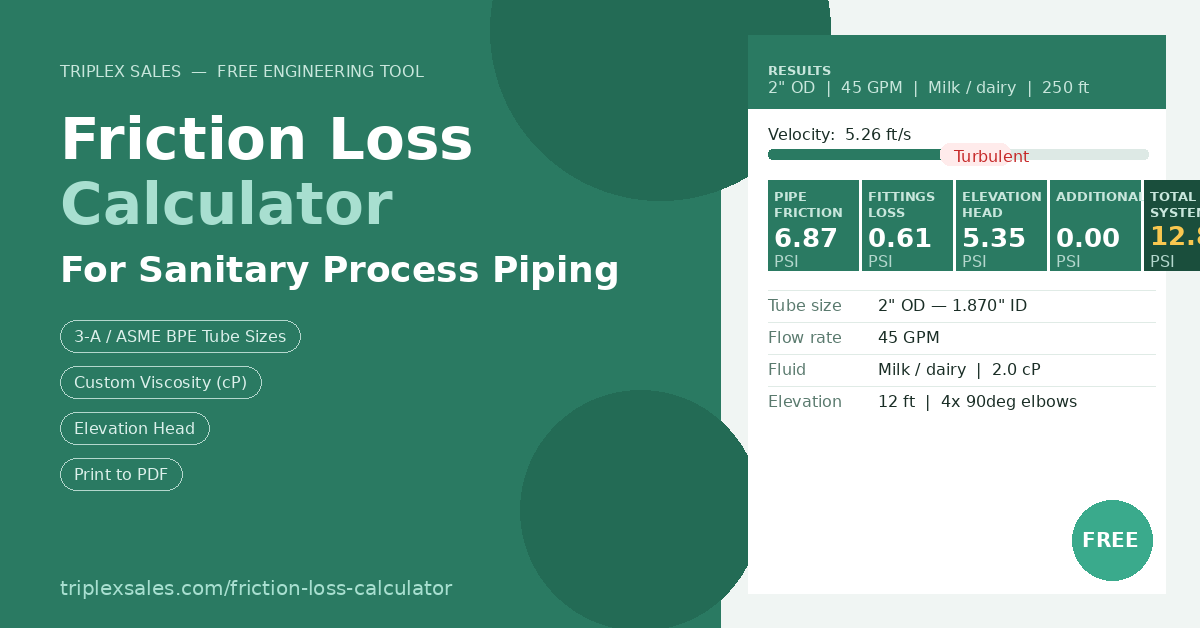
If you’ve ever had to size a pump for a sanitary process line, you know the drill. You pull up a spreadsheet, plug in your pipe size and flow rate, try to remember the right L/D ratios for your fittings, and hope you didn’t forget to account for the elevation change between your tank and your heat exchanger. It works — but it takes time, and it’s easy to miss something.
We built something to make that faster.
Today we’re launching the Triplex Friction Loss Calculator, a free, browser-based tool designed specifically for sanitary and hygienic process piping systems. It lives right on our website at triplexsales.com, and you don’t need to download anything or create an account to use it.

The calculator walks you through six inputs and returns a complete breakdown of your system pressure drop.
What It Does
The calculator estimates pressure drop across a sanitary piping system using the Darcy-Weisbach equation with a Colebrook-White friction factor — the same methodology behind the spreadsheets that engineers have been using for decades. What it adds is speed and convenience.
You put in your tube size (we support all standard 3-A / ASME BPE sanitary OD sizes from 1/4” through 8”), your flow rate, pipe length, and fluid properties. You can use one of the built-in fluid presets — water, milk, light syrup, CIP solutions, thick sauces — or enter a custom viscosity in centipoise and specific gravity for your exact product. Then add your fittings: elbows, tees, butterfly valves, diaphragm valves, check valves, and more. Enter your vertical rise if you’re pumping uphill. Throw in any additional head loss for heat exchangers or strainers. Hit calculate.
- ✓Tube sizes 1/4” to 8” OD — all standard 3-A / ASME BPE sanitary dimensions with actual IDs per the MGNewell Sanitary Piping Reference Guide
- ✓Fluid presets — water, milk/dairy, light syrup, CIP solutions, thick sauces, solvents — or enter custom viscosity (cP) and specific gravity
- ✓8 fitting types — 90° elbows, 45° elbows, tees (thru and branch), butterfly, ball, diaphragm, and check valves using Crane TP-410 K-value method
- ✓Elevation head — positive for pumping uphill, negative for downhill runs
- ✓Imperial and metric — toggle between PSI/GPM/feet and kPa/L/min/meters
- ✓Flow regime indicator — shows laminar, transitional, or turbulent in real time
- ✓Print / PDF — one-click formatted report ready to save or share
Reading the Velocity Indicator
One of the most useful features is the velocity bar — a color-coded indicator that tells you instantly whether your flow rate is in the right range for sanitary service.

The velocity bar color-codes your flow rate: blue means settling risk, green is the sanitary service sweet spot, red means erosion and noise risk.
The recommended range for most sanitary applications is 3 to 8 ft/s. Below that, you risk product settling or inadequate pipe sweep. Above it, you’re looking at accelerated erosion, excessive noise, and a steep climb in pressure drop. The bar shows you where you land immediately — no math required.
Understanding Your Results
The calculator doesn’t just give you a total — it breaks out every component of pressure loss individually. That matters when you’re trying to figure out whether your system head is dominated by pipe friction, fittings, elevation, or something else.

Every pressure loss component is shown individually. Total system head is the minimum pump head you need to specify.
The total system head is your starting point for pump selection. Add a 10–15% safety margin on top of that number and use it to evaluate pump curves. If the intersection of your flow rate and system head falls within the pump’s efficient operating range, you’re in good shape.
Why Viscosity Changes Everything
One thing that surprised us in building the calculator: the Reynolds number — and therefore the flow regime — changes dramatically with viscosity. This has a profound effect on both friction loss and the effectiveness of your CIP program.

Same pipe. Same flow rate. Water hits Re = 115,000 (turbulent). A 1,000 cP syrup hits Re = 115 (laminar) — and friction loss skyrockets.
Water at 50 GPM in 1.5” tube is deeply turbulent at Re = 115,000. That same flow rate with a 1,000 cP syrup drops to Re = 115 — well into laminar territory. In laminar flow, friction loss is calculated differently (Hagen-Poiseuille rather than Darcy-Weisbach), and the numbers get very large very quickly. This is why pump sizing for viscous products requires a purpose-built tool — a water-based rule of thumb will get you into trouble fast.
The calculator handles all of this automatically. It detects the flow regime, applies the correct friction factor equation, and flags the result so you know what you’re working with.
The Print / PDF Report
When you’re done, click Print / PDF to generate a clean, formatted one-page report with all your inputs, fittings, and results. It’s designed to be shareable — hand it to an engineer, attach it to a quote, or save it as a PDF for your project files.

The formatted report includes all inputs, fittings, individual loss components, and total system head — ready to save or share.
Why We Built It
Honestly, because we use tools like this ourselves. When we’re helping a customer select a pump, one of the first things we need to know is what the system actually demands. Having that calculation be fast, accessible, and right in front of you makes those conversations go a lot better.
We also wanted something we could point customers to when they’re doing their own preliminary sizing — something more useful than a downloadable spreadsheet that requires a specific version of Excel and gets emailed around until nobody knows which copy is current.
The calculator is free to use, no strings attached. If it helps you spec a pump and you want to talk through options, you know where to find us.
Try it free — no account required
Estimate pressure drop in your sanitary piping system in seconds. Size 1/4” through 8” OD, any fluid, any fitting configuration.

